
What Is Rentablez Guard?
Rentablez Guard protects the laptops you rent out. You install a small program — the Device Guard agent — on each laptop before it leaves your premises. It stays connected to your Rentablez account in the background, so if a customer stops cooperating you can lock the laptop from the Guard app: a full-screen lock appears and stays until you unlock it.
It also tells you when someone swaps out the RAM or SSD, shows the city a laptop last connected from, and on business laptops checks that the BIOS protections are set up. It never reads, deletes or encrypts the customer’s files.
Guard on its own, or with Rentablez. You can subscribe to Rentablez Guard by itself and sign in to the separate Guard app, which shows only your laptops. If you also use Rentablez for rentals, Guard can be added to your plan: the same sign-in works in both, and Device Guard also appears in the main app under Settings → Device Guard. See the product page at rentablez.com/rentablez-guard.
What Guard Does
| Feature | What it does | Works on |
|---|---|---|
| Remote lock | Lock or unlock a laptop from the Guard app. An online laptop locks within a few seconds and stays locked through restarts and while offline. | Windows, Mac, Linux (Beta) |
| Lock-screen message | Your own heading, message and contact details on the lock screen, set once for the whole company. | Windows, Mac, Linux |
| Unlock code | Unlocks a locked laptop that has no internet, for 1, 3 or 7 days, with a one-time code. | Windows, Mac, Linux |
| Hardware swap alert (Beta) | Alerts you by email or WhatsApp when the RAM, SSD, processor or other parts change. | Windows, Mac, Linux |
| Approximate location | The city a laptop last connected from, with a map and 7, 30 or 90 days of history. No setup needed. | Windows, Mac, Linux |
| Precise location | Street-level position from Wi-Fi or GPS, plus Locate now. Optional, and only with the customer’s permission. | Windows, Mac, Linux |
| BIOS anti-theft check (Beta) | Confirms the BIOS supervisor password and bottom-cover tamper detection are on. | Lenovo ThinkPads (Windows) |
| OS format protection (Beta) | Switches off Reset this PC and checks the BIOS boot settings that stop a USB reinstall. | Lenovo ThinkPads and Dell Latitudes (Windows) |
| Server network cut (Beta) | On a machine set up as a server, Lock also blocks every connection except its link to Rentablez. | Linux |
| Health monitor (Beta) | Disk space, memory, temperature, load and failed services every 5 minutes, with an alert when a reading turns critical. | Linux |
You choose which protections to switch on for each laptop when you install it.
Windows, Mac and Linux at a Glance
| Windows | Mac | Linux (Ubuntu / Debian) — Beta | |
|---|---|---|---|
| Remote lock and unlock | Yes | Yes | Yes |
| Stays locked offline or after a restart | Yes | Yes | Yes |
| Hardware swap alert | Yes | Yes (on Apple Silicon, total memory only) | Yes |
| BIOS anti-theft check | Lenovo ThinkPads only | No | No |
| OS format protection | ThinkPads and Dell Latitudes | No | No |
| Network cut on lock | No | No | Yes, when set up as a server |
| Health monitor | No | No | Yes |
| How strong the lock is | Strong — escape keys blocked, service can’t be stopped even by a Windows administrator | Good effort — a determined user with a second admin account can get around it | Strong for a standard account |
| What you install | One signed .exe |
One signed .app |
One .deb package |
Beta features. Hardware swap detection, the BIOS anti-theft check, OS format protection and the whole Linux agent are in Beta. On a Mac, remote lock, the lock-screen message and staying locked offline are tested; hardware swap alerts and unlock codes on Mac are not fully tested yet. Try Beta features on one or two laptops first and report anything unexpected to Rentablez support.
Where Things Are in the Guard App
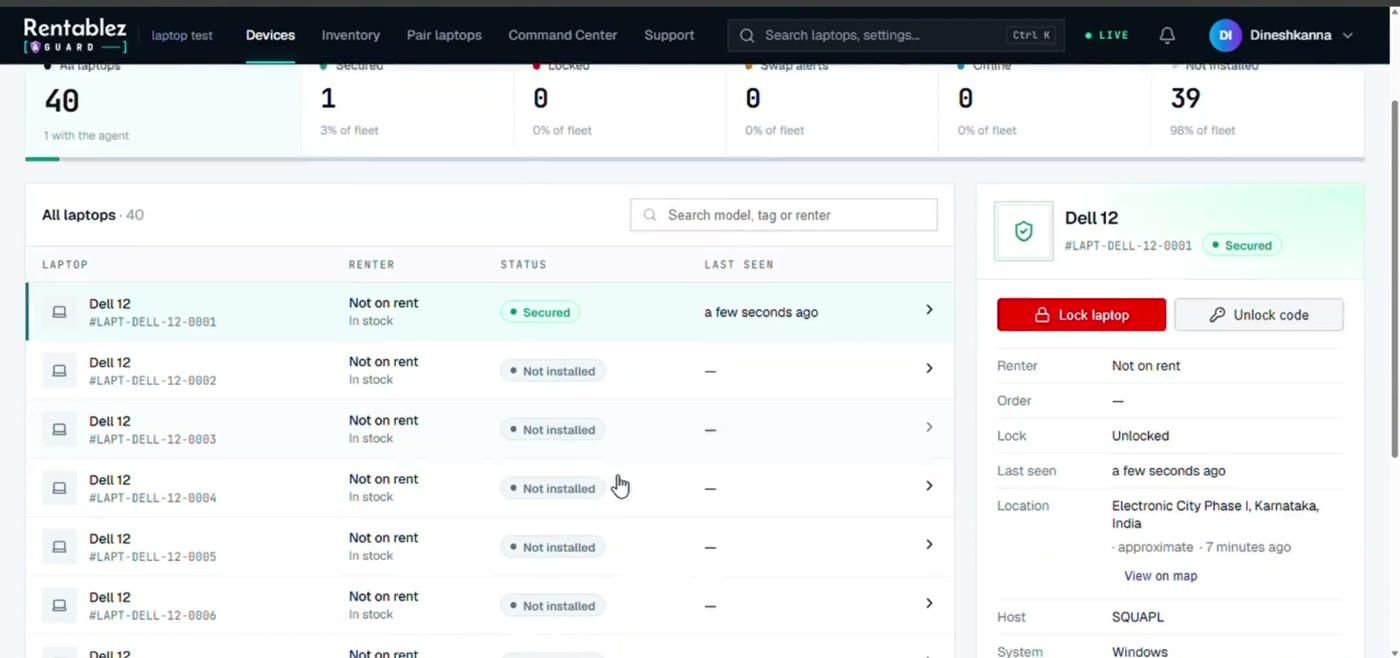
- Devices — every laptop with its status: Secured, Locked, Swap alerts, Offline or Not installed. Select a laptop to see its renter, lock state, last seen time, location and agent details, and to lock or unlock it.
- Inventory — your laptop models and units (asset tag, serial number, purchase details).
- Pair laptops — map laptops that were installed without an activation code.
- Command Center — a full-screen, live overview of the whole fleet, with a full map and the same lock and unlock actions.
- Settings — lock-screen message, alerts, swap history, BIOS anti-theft, OS format protection, audit trail, users and roles.
What Guard Will Not Do
- It does not touch the customer’s data. It is a screen lock, not a wipe tool.
- It never locks by itself. Unpaid invoices, a hardware swap or being offline never lock a laptop — only you clicking Lock laptop does.
- It cannot lock or locate a laptop that is offline. The lock arrives when the laptop next connects; the map shows the last place it connected from.
- It cannot stop a determined administrator. Give customers a standard (non-admin) account. If someone removes the agent anyway, the laptop shows Offline and its Last seen time stops moving.
- It does not set up the BIOS for you. You set the BIOS password and boot settings by hand; Guard checks and reports on them.
- Windows cannot block Ctrl+Alt+Del, and a Mac can be got around with a second administrator account or by starting from Recovery.
- It is not a legal substitute. Your rental agreement must allow you to lock the device and tell the customer that its location is recorded.